At the Google I/O developer conference this week, we got a sneak peek at its upcoming AI-powered glasses — not just audio glasses, which Google says will start shipping this fall, but rather glasses that offer a combined audio and visual experience.
First announced at last year’s event, these Android XR glasses offer an in-lens display that puts useful information in front of you and overlays the real world. This includes widgets that can display things like weather, walking routes, Uber pickup details, live translation, and more—even widgets you’ve designed yourself using AI.

The glasses will also pair with iOS and Android phones, the company noted, both in audio format and in a future display version.
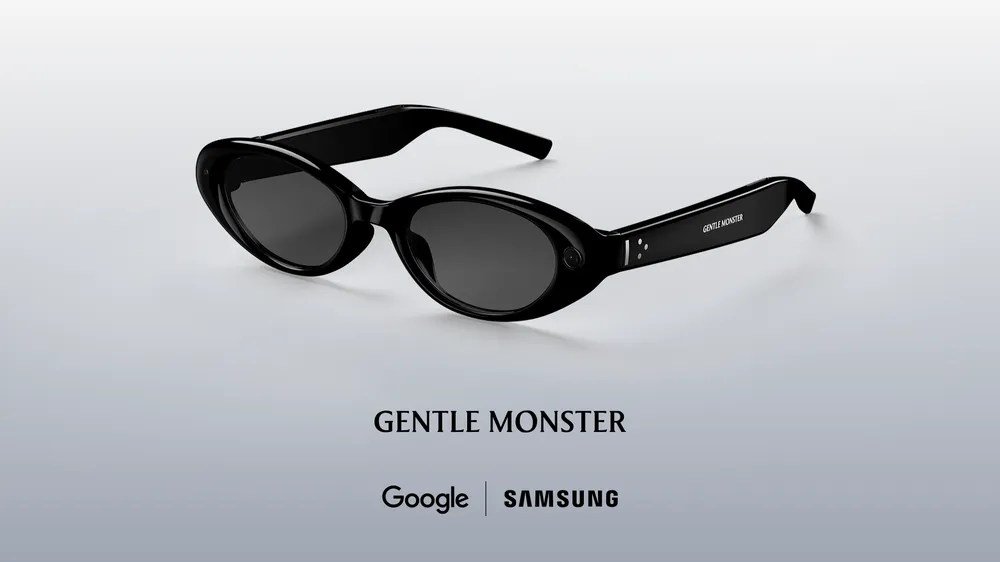
The display glasses are supposed to be the next step after the first generation of audio glasses, which will be released later this year. The glasses themselves were developed in collaboration with Warby Parker, Gentle Monster and Samsung, and combine Google technology with their brands’ design aesthetics.
The glasses we tested, meanwhile, were still very much a prototype, albeit one polished enough to now be tested externally. Representatives showing off the XR Glasses explained that the prototype allowed Google to not worry about some of the cosmetic details related to different styles and shapes, so it could instead focus on experimenting more freely with display technology and its effects on battery life. This means that these glasses are very different from any future release of the glasses in terms of fit, shape, dimensions and attention to detail. Rather, it’s like being able to experiment with the “innards” of the glasses while still being in a basic comfortable frame.
The shipping version of the glasses will be able to recognize when you put the glasses on and off your head, but the ones we tested didn’t have this feature.

To activate Gemini, you would do a two-second press on the right side of the glasses frame. An introductory chime will sound to let you know Gemini is on and listening. In the demo version, running Gemini would also start the camera at the same time, but the shipping version will allow the user to configure whether they want to turn on the camera when Gemini starts or not.
In an initial test, we played music through the glasses by asking Gemini to play a favorite artist. Unfortunately the place was too noisy to judge the sound quality as the music was turned up to maximum volume and it was still quite difficult to hear sharp and detailed. But the initial impression from this limited experience was that the glasses weren’t going to be a great replacement for better quality earbuds, although they would be handy if you just wanted some music while you were out and about, walking, walking or doing chores. The benefit of going without headphones is that it’s easier to hear someone talking compared to the transparency mode on devices like Apple’s AirPods.
To turn off the music, just tap once on the side of the frame, roughly in the middle, as if tapping to sleep.

In the second test, we pressed the photo button with our finger to take a picture of the person. The display was off, so the image was transferred to our phone and watch. (Later, you’ll be able to capture video with a long press, but this option wasn’t available for testing with the prototype. For video, you’d see a thumbnail preview of the video instead of a photo.)
You can also simply ask Gemini to take a photo without pressing the photo button and do some artificial intelligence manipulation. For example, you can say something like “take a picture and turn the person into an anime character”. The photo is sent to the phone, then to the Gemini and Nano Banana servers, and then comes back in an edited version.
At Google I/O, where the Wi-Fi was heavily loaded, the round trip took about 45 seconds.

When the view is activated, you will see a simple home screen in your field of view. The demo version had some widgets pre-installed that showed the weather and the countdown to the Google I/O event. You can also build quick launchers into specific apps like Google Maps or Translate if those were among your main use cases for the glasses.
The prototype had only one display above the right eye, but the platform can support both single and dual displays, as well as audio-only glasses. The image itself was a bit blurry, but we put that down to our prescription contacts, which involve wearing one lens optimized for distance on one side and one optimized for near vision on the other. When we closed one eye, the image focused better, but the experience almost immediately caused us some eye strain over the right eye, and it’s unclear if the prescription was to blame.

One of the best demonstrations was the language translation on the glasses, which is supported by the Google Translate app on the phone. One of the demonstrators spoke fluent Spanish and the glasses automatically recognized the language and displayed English text on the display while Gemini spoke English into our ear. We could see globetrotters buying glasses just for the experience.
We should note that Translator will also work on audio-only glasses without the text being displayed on the glasses themselves. Instead, you could see the transcript on your phone in addition to real-time audio feedback if needed.
Another demonstration involved using the glasses to navigate. While we obviously couldn’t go outside for a walk and leave the place to test its accuracy, we could get an idea of how it would work. You can start Google Maps by asking Gemini to navigate you to a destination – which can even be as vague as something like “nearest coffee shop”.
Gemini activates Google Maps on your phone, but you don’t have to take your phone out of your bag or pocket to use it. After a short delay for the experience to load, the glasses will then display step-by-step instructions. As you look forward, information about your next turn will be displayed. But if you need to orient yourself in space, you can look down at the ground and see your blue dot on the map. You can also turn left and right and rotate in space, just like trying to get the blue dot pointing in the right direction on your phone.
Then, when you look up again, you can continue walking without the map getting in the way.
Because this experience is tied to Google Maps on your phone, saved destinations like “home” and “work” will already be available.

We were also able to briefly use the glasses to identify various objects in our view and ask them questions. The glasses initially struggled to identify the replica Monet painting on the shelf in front of us, but that’s because the prototype didn’t automatically activate the camera — it had to be turned on again from the app. Still, it took a few questions for Gemini to say it looked like Monet, even as we zoomed in and focused on Monet’s signature in the lower left.
The next tests went smoother as the jars immediately identified the plant on the shelf and answered questions about the various recipes in the book. Still, we wondered how these are things you can do today with Google Lens (or other AI models integrated into chatbot apps), although we suppose it’s interesting to be able to do them without pulling out your phone.
Google says it will have more information about its Android XR display glasses later this year when it expands its trusted tester program.

Meanwhile, the company believes the audio will be enough for some users’ needs, perhaps a clever way to spin the fact that it doesn’t have display glasses ready, despite competition from the Meta and Snap on that front.
Like the display version, the audio glasses also provide access to Google’s Gemini AI, which you hear privately through the speakers in the glasses frame. From these glasses you can do things like listen to music through the glasses, press the button to take a photo, make a call or tap apps on your phone, as well as future versions of the display.
Tapping into other third-party apps wasn’t among the items we showed off, but the glasses will let users tell Gemini to do things like “take the ingredients from this recipe and add them to my shopping list.”
In another example that Google demonstrated during the event’s keynote, the glasses could see food that the user was cooking on the stove and offer feedback about the food, such as whether the meat was fully cooked yet.
We may earn a small commission when you make a purchase through links in our articles. This does not affect our editorial independence.
About The Author